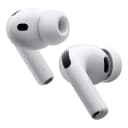
Apple
AirPods Pro 3 with Hearing Aid Feature
FDA-cleared OTC hearing aid software
In 2024 Apple turned the AirPods Pro 2 into the first FDA-authorized over-the-counter hearing aid software — the cheapest way to try a real hearing aid. Here's how to take the built-in hearing test, switch the feature on, fix it when it's greyed out, and know where its limits are.
Not sure whether your loss is in OTC range? The severity quiz and audiogram interpreter give a free estimate before you buy anything.
The AirPods Pro 3 (or the AirPods Pro 2, which Apple discontinued in September 2025 but still fully supports), paired with an iPhone or iPad on iOS 18 or later, can act as a clinically validated, FDA-authorized over-the-counter hearing aid for adults with perceived mild-to-moderatehearing loss. You take a five-minute hearing test in the Settings app; the AirPods then amplify the specific pitches you've lost. At roughly the price of the earbuds themselves, it's the lowest-cost entry into the entire OTC hearing-aid category.
| What you need | Detail |
|---|---|
| AirPods | AirPods Pro 2 or Pro 3, with the latest firmware |
| Device | iPhone or iPad on iOS / iPadOS 18 or later |
| Who it's for | Adults 18+, perceived mild-to-moderate hearing loss |
| Availability | Supported countries/regions (rolling out — check your Settings) |
You can also import a hearing test you already have. If you have a recent audiogram, our audiogram interpretercan help you read it and confirm you're in the mild-to-moderate range these devices serve.
If you can't find or tap the feature, work through these in order — they cover nearly every case:
Yes. In September 2024 the FDA authorized Apple's Hearing Aid Feature as the first over-the-counter hearing aid software, for adults with perceived mild-to-moderate hearing loss. That is a real regulatory clearance — it is nota PSAP (a personal sound amplifier that isn't an FDA hearing aid). In our guide to the FDA pathways, AirPods Pro fall under the software (SCR) hearing-aid clearance — the same category of genuine OTC device, just delivered through earbuds you may already own.
AirPods are a superb, low-risk way to find out whether amplification helps you — but they aren't a full substitute for a dedicated hearing aid. Battery life is a few hours rather than all day, the earbud form is more noticeable and less comfortable for continuous wear, and, like every OTC device, they only serve perceived mild-to-moderate loss. If the hearing test confirms you benefit and you want all-day wear or a more discreet, longer-lasting device, a dedicated open-fit OTC hearing aid is the natural next step — see our picks below. And see a doctor first if your hearing loss came on suddenly, is in one ear only, or comes with dizziness or ear pain.
AirPods are the cheapest way to try amplification; these are FDA-cleared OTC hearing aids for all-day use, in ascending price order. Severity fit verified against each product's cleared range.
Apple
At $199-$249 with FDA-cleared hearing aid software (DEN230081), the AirPods Pro 3 turn an iPhone you may already own into a legitimate mild-to-moderate hearing aid. Lowest-risk way to start.
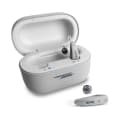
Lexie
Bose-tuned, rechargeable, self-fitting via the Lexie app, with a 45-day trial. $899 — a fraction of the audiologist price for the same mild-to-moderate range.
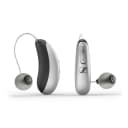
Sennheiser
Built by Sonova (the company behind Phonak), the All-Day Clear is a true QUH self-fit hearing aid with Bluetooth streaming and a 2-year warranty — around $949 street.
Picks are based on FDA regulatory pathway, price, and severity fit from our verified product database — not on which brand pays the most.
Yes. In 2024 Apple added a Hearing Aid feature to the AirPods Pro 2, and the FDA authorized it as the first over-the-counter hearing aid software. With AirPods Pro 2 (or Pro 3) and an iPhone or iPad on iOS 18 or later, you take a built-in hearing test and the AirPods apply personalized amplification tuned to your results. It's intended for adults with perceived mild-to-moderate hearing loss — not for severe or profound loss.
Update your AirPods Pro firmware and your iPhone/iPad to iOS 18 or later, then put the AirPods in. Go to Settings, tap your AirPods at the top, open Hearing Health, and take the Hearing Test (about five minutes in a quiet room) — it produces a personal hearing profile. After the test you can turn on the Hearing Aid feature, which uses that profile to amplify the sounds and voices you're missing. You can fine-tune amplification and tone in the same menu.
The most common reasons: you're not on AirPods Pro 2 or Pro 3 (earlier AirPods and the standard models don't support it); your iOS/iPadOS or AirPods firmware isn't updated to a version that includes the feature; the feature isn't yet available in your country/region; or the Apple ID in use isn't set to age 18 or older. Fixes, in order: update iOS and AirPods firmware, confirm your exact AirPods model, check regional availability, and verify your age setting. A poor ear-tip seal can also block the hearing test from completing — run the ear-tip fit test first.
They are a real, FDA-authorized over-the-counter hearing aid — not a PSAP (personal sound amplification product). The FDA cleared Apple's Hearing Aid Feature as OTC hearing aid software in September 2024 for adults with perceived mild-to-moderate hearing loss. That puts AirPods Pro 2 in the same regulated category as other OTC hearing aids, at the lowest entry price in the category.
They're a genuine OTC hearing aid but not a full replacement for a dedicated one. Battery life is a few hours per charge rather than all day, the earbud form is more visible and less comfortable for continuous wear, and — like all OTC devices — they're only for perceived mild-to-moderate loss, not severe or profound. They're an excellent low-cost way to try amplification; if you want all-day wear or more power, a dedicated open-fit OTC hearing aid is the next step.
Only the AirPods Pro 2 and AirPods Pro 3. The original AirPods Pro (1st generation), the standard AirPods, and AirPods Max do not include the Hearing Aid feature. You also need an iPhone or iPad running iOS/iPadOS 18 or later and the latest AirPods firmware.